User Manual
For Deco Planner 2.0 ・ Last updated: 2026-10-05
Read this first. Deco Planner is a tool for checking a dive plan before you dive. It does not replace training, your agency's procedures or a dive computer. Never dive on the calculated numbers alone. In the water, always follow your training agency's procedures, the limits of your training and your dive computer.
Contents
- What the app does
- Screen layout
- Your first plan
- Reading the answer bar
- ① Dive
- ② Gas & minimum gas
- ③ Deco
- ④ Range & lost gas
- Δ (scenarios and GF)
- Carry (card, note, QR)
- Saving and loading plans
- ⚙ Settings
- Limits used for the verdict
- Glossary
- FAQ
1. What the app does
For a dive whose depth, time and gases are more or less decided, it lets you check before you dive:
- whether the plan works (the verdict), with deco, run time, turn pressure and minimum gas;
- the decompression schedule (Bühlmann ZH-L16C or ZH-L16b + Gradient Factors);
- tables for going deeper or longer (range) and for losing a deco gas (lost gas);
- what changes with another GF, depth or time (Δ);
- an underwater card, wetnote text and a QR code to carry and share the plan.
Everything is calculated on the device. No network and no account are needed, and no data leaves the device.
2. Screen layout
- Top bar: the plan name (tap for your plans) and ⚙ (Settings).
- Answer bar: verdict, deco, RT, TP and MG. It stays on top on every tab (section 4).
- Tabs:
- Plan: a worksheet in reading order — ① Dive → ② Gas & minimum gas → ③ Deco → ④ Range & lost gas.
- Δ: a depth × time matrix to compare what-ifs and GFs.
- Carry: underwater card, note and QR.
On iPad and Mac, Plan, Δ and Carry use two columns.
3. Your first plan
- In ⚙ › Diver › Level, choose Recreational or Technical. The plan switches to that level's default (gases, GF, ascent mode).
- In ① Dive, set the depth and the bottom time (including the descent).
- In ② Gas & minimum gas, check the bottom-gas tank and its pressure, and add + Deco gas or + Travel gas if needed.
- Check that the answer bar shows ✓, and look at the stops in ③ Deco.
- In ④ Range & lost gas, check that you can still surface when the dive goes deeper or longer, and when a deco gas is lost.
- On the Carry tab, take the plan with you as an underwater card or wetnote text.
4. Reading the answer bar


| Item | Meaning |
|---|---|
| ✓ / ✗ | Any error (✗) makes the plan not work. The second line gives the most serious reason, how many more there are, and how many lost-gas cases cannot surface. Tap it to jump to the section with the cause (②, ③ or ④). |
| Deco | Total stop time, including the travel between stops (section 7). |
| RT | Run time: from leaving the surface to reaching it again. |
| TP½ etc. | Turn pressure: turn the dive at this pressure (½ or ⅓ is the gas rule). |
| MG | Minimum gas: what must stay in the bottom gas so the team can surface after a problem. |
5. ① Dive
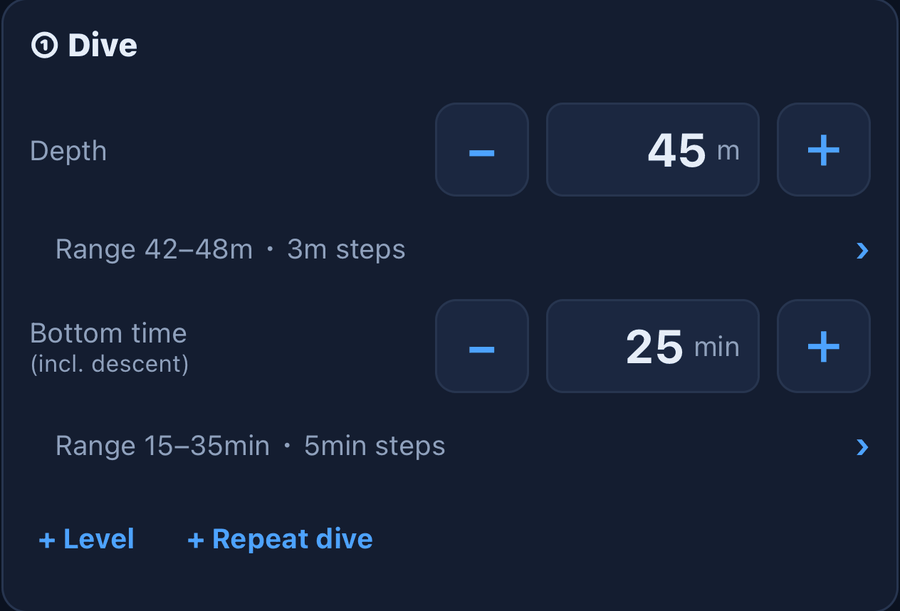
- Depth and bottom time: use − / + or tap the number. The bottom time runs from leaving the surface until you start the ascent (it includes the descent).
- Range (Range 42–48m · 3m steps ›): how many steps deeper/shallower and longer/shorter, and the step size. The ④ tables and the Carry tables use this range.
- + Level: a multi-level dive. Each level has a depth, the run time when you leave it, and the bottom gas you breathe there.
- + Repeat dive: add a second (or later) dive. With the surface interval (SI), residual nitrogen and CNS carry over.
6. ② Gas & minimum gas
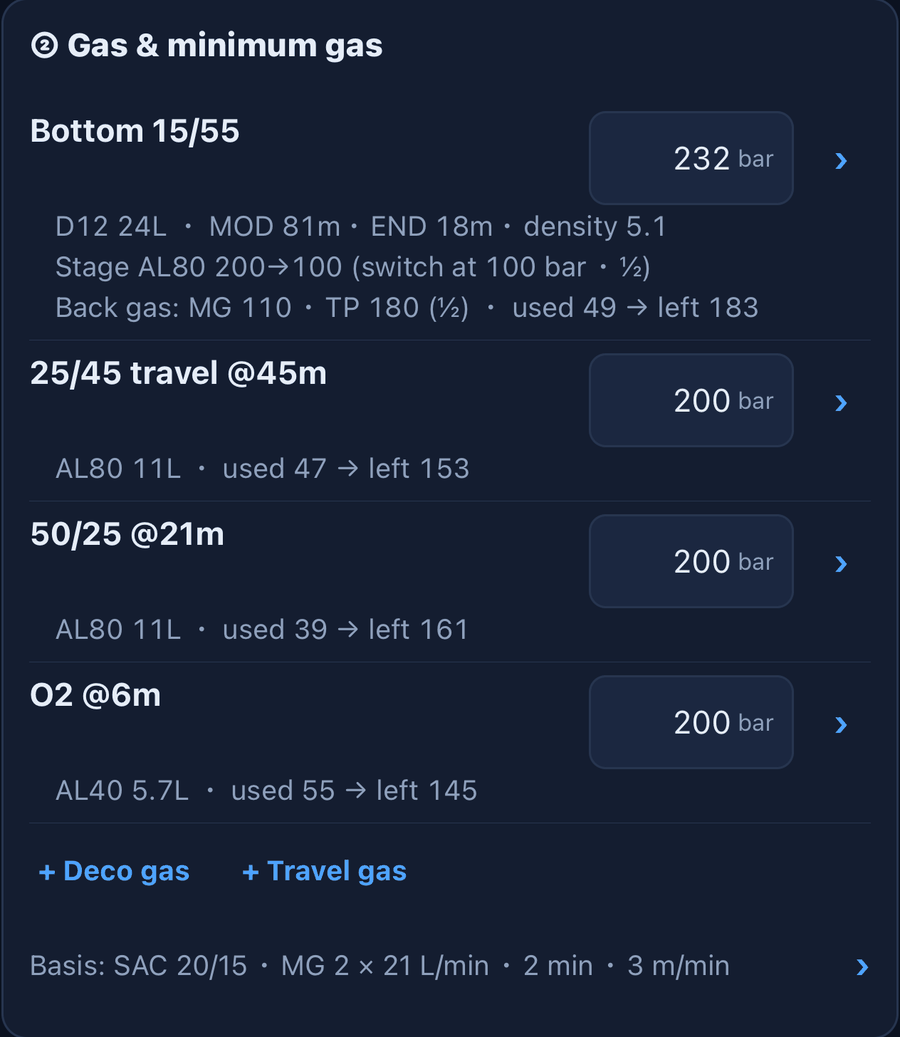
- Bottom gas: tank, MOD (deepest depth at ppO₂ 1.6), END, gas density, MG and TP, used → left. A row gets ✗ when it falls short.
- Type the start pressure in the box on the right. Use the row's › to change the mix (O₂, He; an analysed mix is marked “analyzed”), the tank and the switch depth.
- + Stage (from the bottom gas row's ›): another tank of the same mix. The stage is breathed first, up to the gas-rule share, and the minimum gas stays in the back gas. The stage switch pressure is shown unrounded.
- + Travel gas: a gas for the descent. You can carry several; they are used shallowest switch depth first. Turn off Also use on the ascent to use a travel gas for the descent only — it then counts only in emergencies (the lost-gas tables).
- + Deco gas: a gas for the ascent. It is used from the depth where it becomes usable (its switch depth) — e.g. EAN50 from 21 m, O₂ from 6 m.
- Basis (Basis: SAC 20/15 · MG 2 × 21 L/min · … ›): tap to open the minimum-gas settings, where the MG breakdown is also shown.
7. ③ Deco
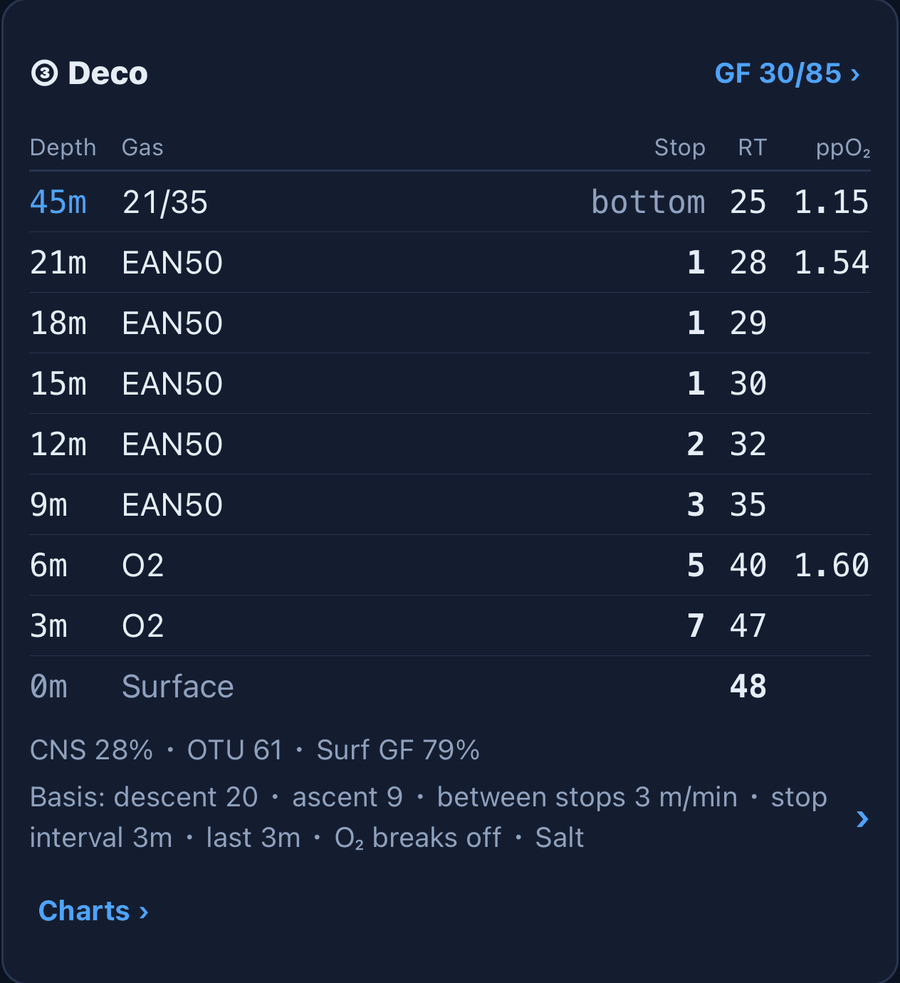
| Column | Meaning |
|---|---|
| Depth, Gas | The stop depth and the gas you breathe there; ppO₂ is shown where the gas changes. A teal “switch” row is a gas switch without a stop. |
| Stop | Stop time [min], from leaving the previous stop to leaving this one (travel between stops included). For the first stop, from arriving to leaving. |
| RT | The run time when you leave the stop. |
- When the dive needs deco, every stop from the first stop to the last is listed, each at least 1 minute. At 3 m/min between 3 m stops, that minute is the travel itself.
- The first stop is found while ascending, by watching the ceiling (GF Low).
- Below the table: CNS, OTU and surface GF, and the basis (descent, ascent and between-stop rates, stop interval, last stop, O₂ breaks, water). Tap the basis to open the calculation settings.
- GF 30/85 › in the header opens the GF trial in Δ; Charts › opens the profile, GF and gas charts.
- Choose the deco model (ZH-L16C or ZH-L16b) in ⚙ › Calculation (section 12).
8. ④ Range & lost gas
The range table
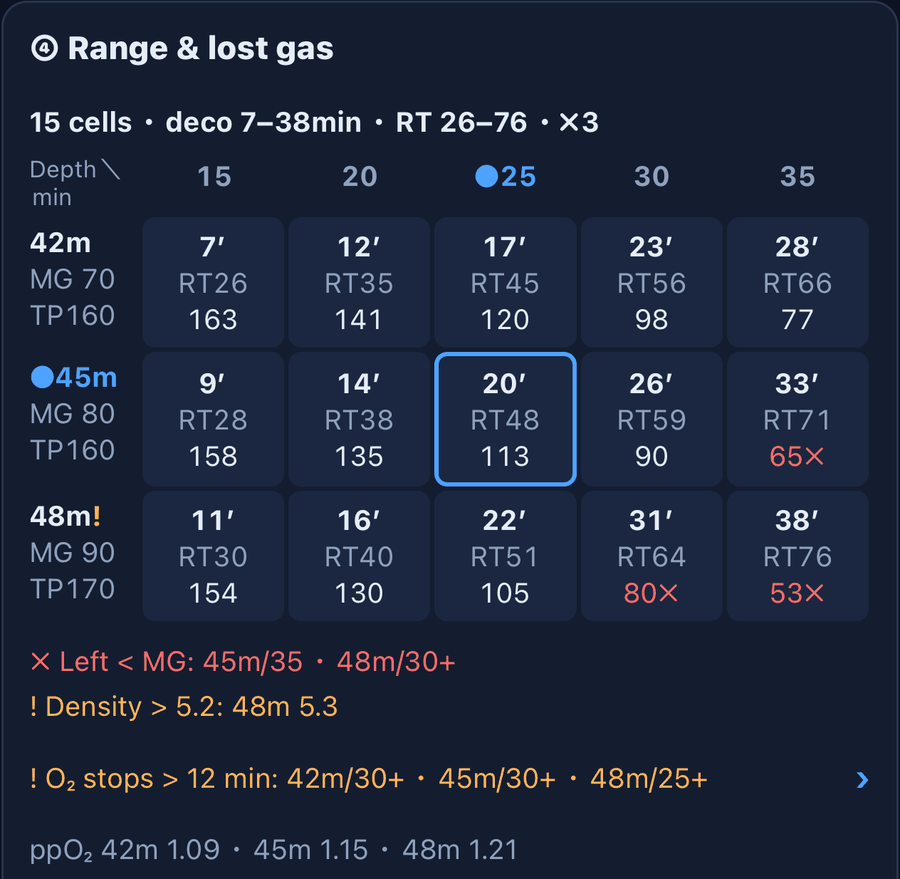
- Each cell shows deco (′) / RT / bottom gas left [bar]. The thick frame is the planned cell.
- ✗ means the cell does not work (e.g. left < MG); ! is a caution. A cell without a mark is fine.
- Row headings show the depth with its MG and TP. Notes that depend on depth alone (ppO₂, END, density) are marked next to the depth.
- Below the table, the cells with ✗ or ! are listed (e.g. ✗ Left < MG: 45m/35 · 48m/30+).
- Tap a cell to open Δ with that cell selected.
Lost gas tables (if a deco gas is lost)
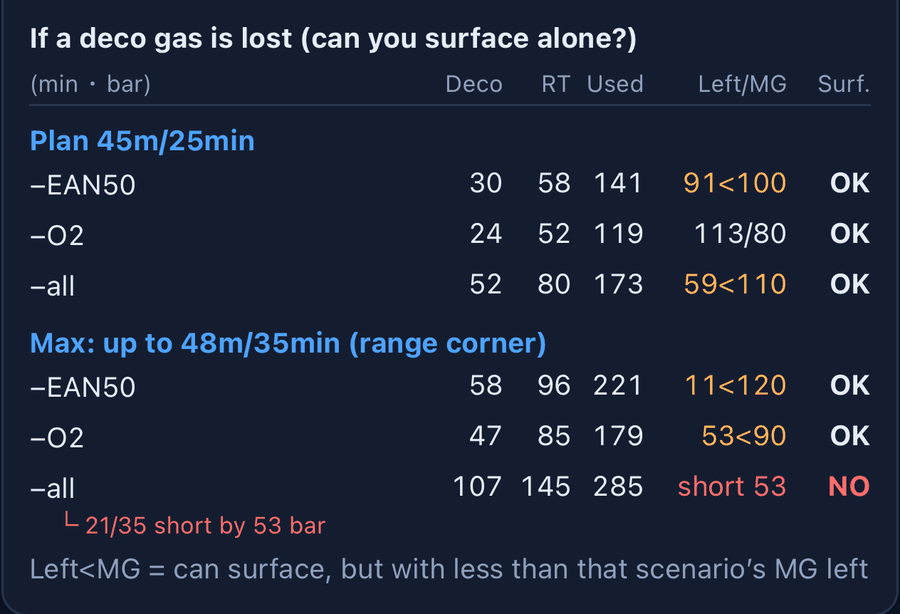
- For each ascent gas lost on its own (−EAN50 and so on) and for all of them lost (−all), the app checks whether you can surface on the gases left.
- Two points are shown: the plan, and the worst point of the range (max).
- Columns: Deco, RT, Used, Left/MG and Surf. (OK / NO). For NO, the line below says why (which gas, how many bar short).
- An amber “91<100” means you can surface, but with less than that scenario's MG left (left < MG).
- Gas shortage, a hypoxic gas, or more than 600 min of deco give NO. Gases you could breathe in an emergency (such as a descent-only travel gas) are counted and listed under the table as “emergency gas”.
9. Δ (scenarios and GF)
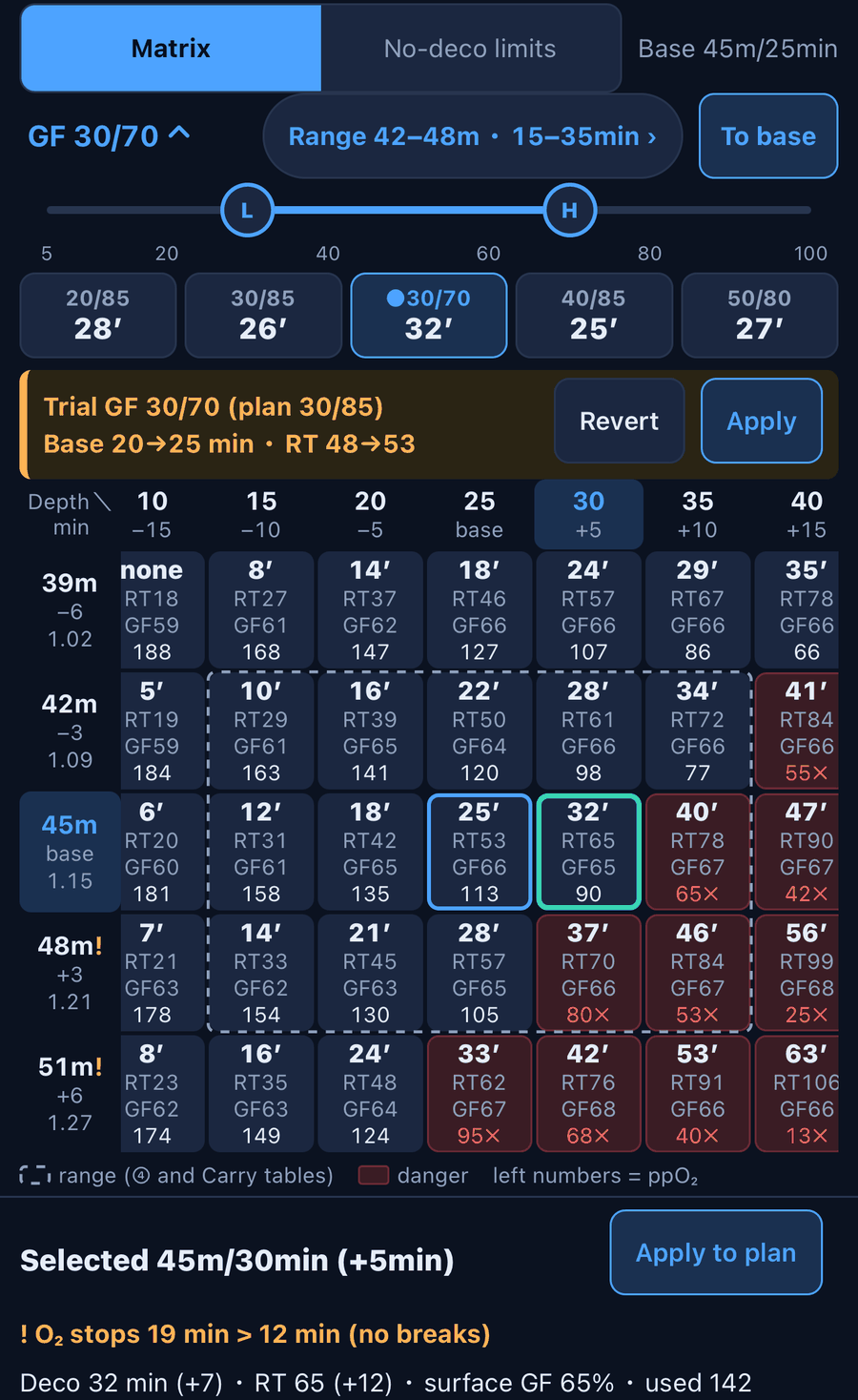
- Matrix: depth × time cells that scroll as far as you like in every direction. Each cell shows deco, RT, surface GF and gas left. The dashed frame is the range used in ④ and on the Carry tab. To base brings the planned cell back.
- Tap a cell to see its stops, gas use and charts below. Apply to plan makes that depth and time the plan.
- Open GF 30/85 ⌃ for GF Low/High sliders and common pairs (20/85, 30/70 …). Picking one recalculates the whole matrix as a trial; choose Revert or Apply (makes it the plan's GF).
- No-deco limits: a chart of the no-stop limit by depth (GF-based for Technical, minimum-deco-based for Recreational).
- Charts: profile with ceiling, GF over time, gas over time, and tissue pressure per compartment (P-P chart).
10. Carry (card, note, QR)
Card
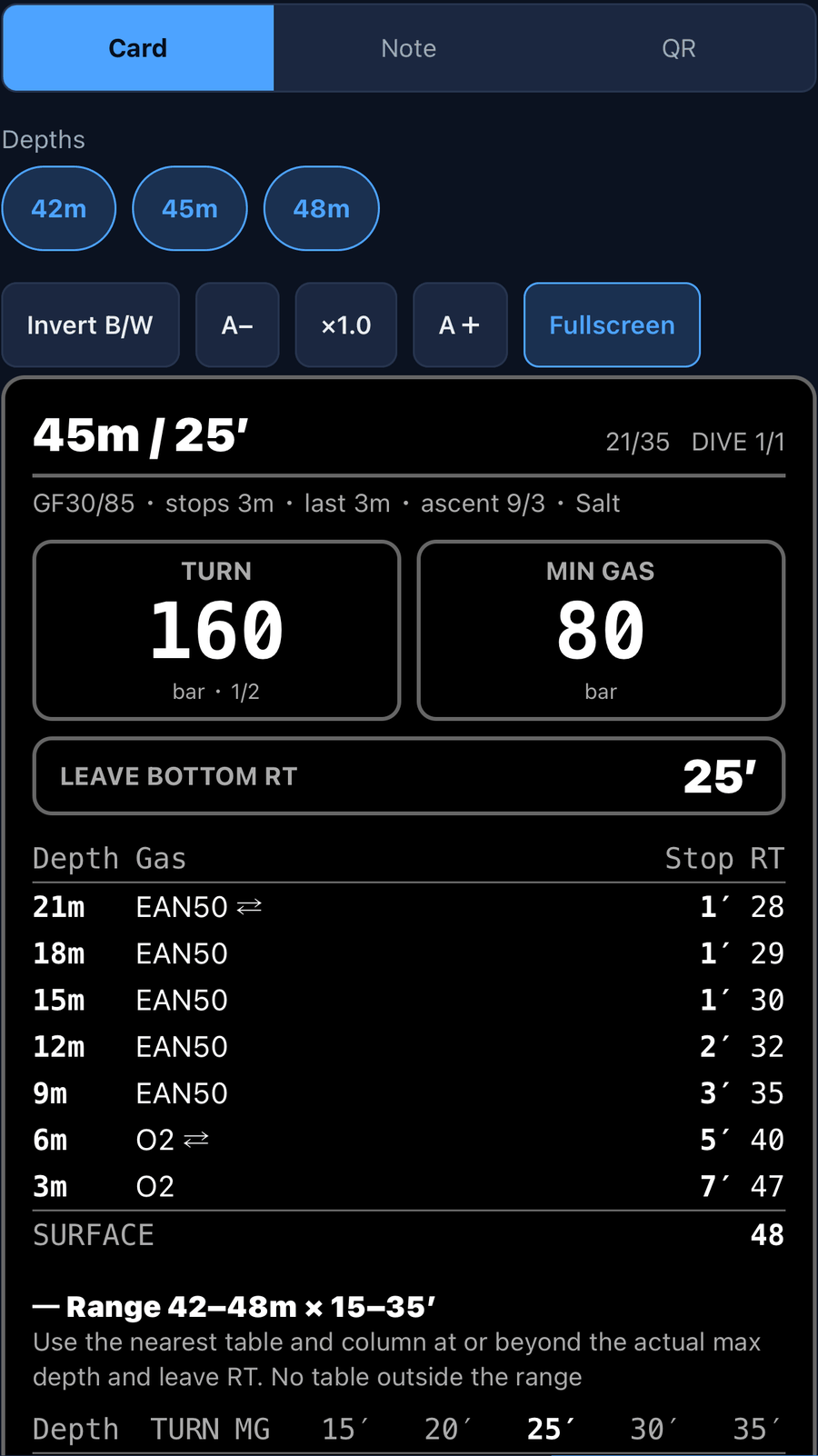
- Turn, min gas and leave-bottom RT, the stop table, the range tables by depth and the lost-gas tables on one card.
- Depths chooses which range rows to include. Invert B/W, A− / A+ (text size), Fullscreen (the screen does not sleep).
- In the water, use the nearest table and column at or beyond your actual max depth and leave RT. There is no table outside the range.
Note
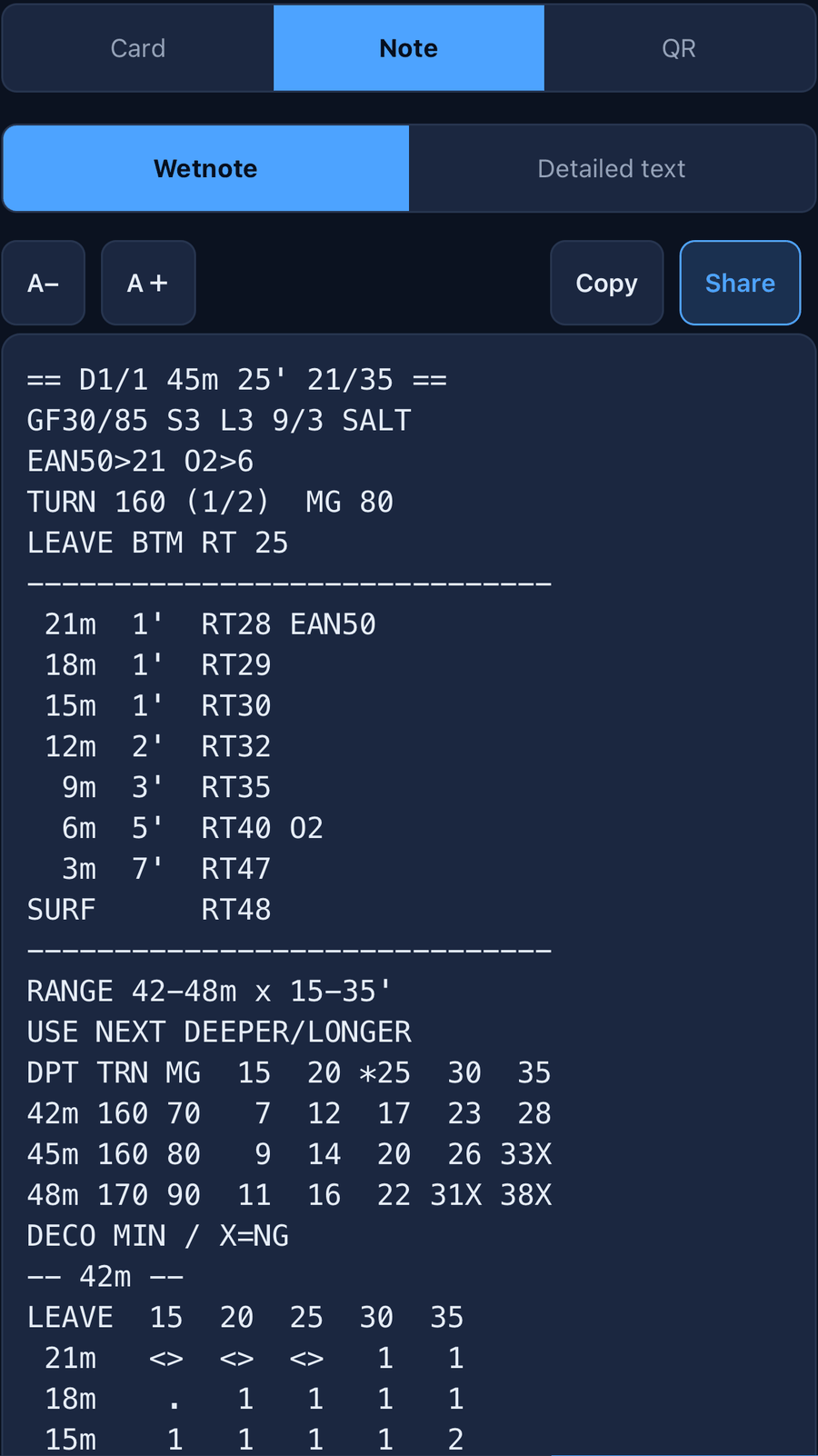
- Wetnote: text of 30 characters or fewer per line, to copy onto a wetnote or slate. Detailed text: the full text, including the calculation basis and the MG breakdown.
- Copy and Share send it to other apps.
QR
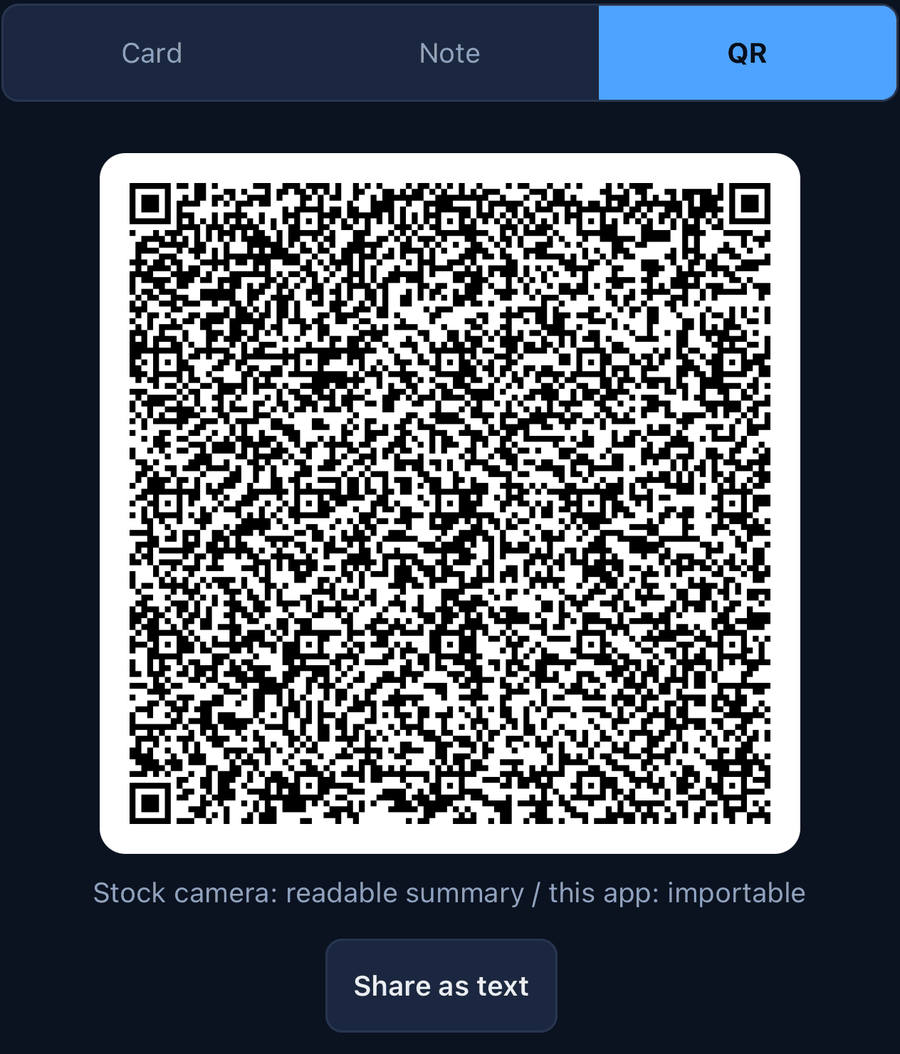
- The QR code holds a summary and the plan data. Any camera can read the summary; this app imports the whole plan.
- If the plan is too large for a QR code, use Share as text.
Changes since the last carry-out
After you copy, share or share as text, any later change to the plan shows a banner on the Carry tab (“N changes since the last carry-out”) and underlines the changed numbers. When you have updated your copy, tap Checked.
11. Saving and loading plans
- Tap the plan name in the top bar to open your plans.
- Save current plan (the working plan is saved automatically), + New plan, open a saved plan, or show its QR code.
- Scan QR: import a plan from someone else's QR code.
12. ⚙ Settings
| Section | Items |
|---|---|
| Display | Language (日本語 / English) and units (m / ft). In ft, the stop interval becomes 10 ft / 15 ft. |
| Diver | Level (Recreational / Technical) and SAC (bottom, deco) [L/min]. |
| Minimum gas (team standard) | Gas rule (1/3, 1/2, All usable), RMV, number of divers, time to solve the problem, emergency ascent rate. The MG breakdown for this plan is shown too. |
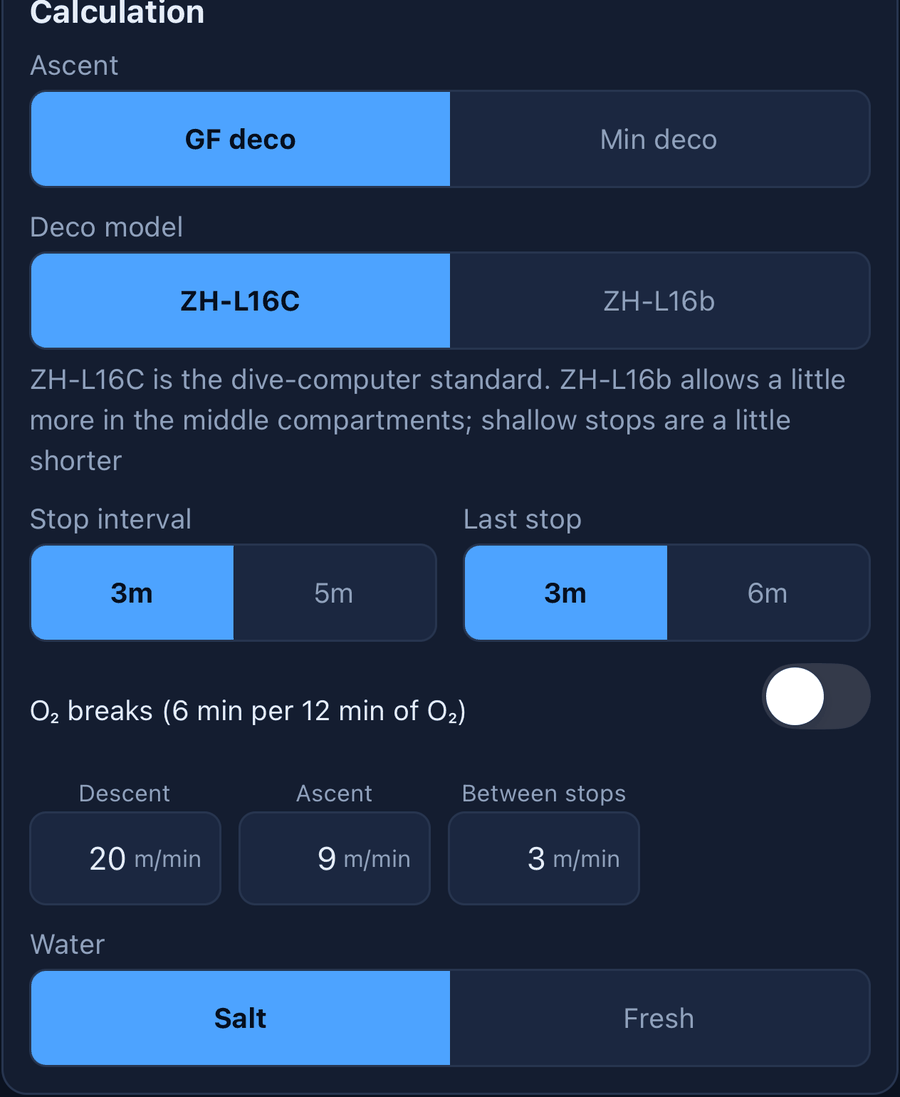
| Calculation | Ascent (GF deco / Min deco), deco model (ZH-L16C / ZH-L16b), stop interval and last stop, O₂ breaks (6 min per 12 min of O₂), descent, ascent and between-stop rates, and water (salt / fresh). |
| Other | Presets (gases & tanks), Privacy Policy, Terms of Use, version. |
Settings are saved with the plan. Opening a saved plan or a QR code brings that plan's settings with it.
13. Limits used for the verdict
An ✗ (error) makes the plan not work; a ! (caution) only warns.
| Item | ! Caution | ✗ Error |
|---|---|---|
| ppO₂ at the bottom | above 1.5 | above 1.6 |
| ppO₂ during deco | — | above 1.6 |
| Hypoxia (ppO₂ of the gas breathed) | below 0.18 | below 0.16 |
| END | above 30 m | above 40 m |
| Gas density | above 5.2 g/L | above 6.2 g/L |
| CNS | above 80% | above 100% |
| OTU | above 300 | — |
| Bottom gas left | — | left at the end < MG |
| Deco and travel gas volume | margin under 1.5× | used > carried |
| O₂ stops (no breaks) | more than 12 min in total | — |
| Lost gas | left < MG (amber) | NO for gas shortage, hypoxia or deco over 600 min |
14. Glossary
| Term | Meaning |
|---|---|
| MG (minimum gas) | The gas a team (two divers by default) needs to solve a problem at the deepest point and ascend to the first gas switch used on the ascent. Converted to bar of the bottom gas and rounded up to 10 bar (at least 40 bar). |
| TP / TURN (turn pressure) | The pressure at which you turn the dive: start pressure minus (usable gas = start − MG) × the gas-rule share, rounded up to 10 bar. |
| Gas rule | The share of usable gas you may use going out: 1/3 (current, caves), 1/2 (out and back), all usable (one-way, drift; TP = MG). |
| RT (run time) | Time since leaving the surface. |
| Deco (total stop time) | The sum of the stop times, including the travel between stops. |
| GF (Gradient Factors) | How much of Bühlmann's tolerated overpressure (M-value) you allow. GF Low applies at the first stop, GF High at the surface, in proportion to depth in between. Lower is more conservative. |
| ZH-L16C / ZH-L16b | Two sets of coefficients for Bühlmann's model. ZH-L16C is the dive-computer standard; ZH-L16b allows a little more in the middle compartments, so shallow stops are a little shorter. |
| Ceiling, first stop | The ceiling is the depth you cannot ascend above with the current tissue loading. The first stop is the deepest stop, found while ascending by watching the ceiling (GF Low). |
| ppO₂ | Partial pressure of oxygen. Too high risks oxygen toxicity; too low risks hypoxia (loss of consciousness). |
| MOD | The depth where the gas reaches its ppO₂ limit (1.6 for deco gases). |
| END (equivalent narcotic depth) | How narcotic the gas is, as the depth on air that would feel the same. The app counts nitrogen only as narcotic. Helium makes it shallower. |
| Gas density | How dense the compressed gas is at depth [g/L]. Denser gas is harder work to breathe and makes CO₂ build up, which worsens narcosis and oxygen toxicity and can lead to loss of consciousness. |
| CNS / OTU | Oxygen toxicity indicators: CNS for the central nervous system (% of the daily limit), OTU for the lungs (cumulative). |
| Surface GF | How close the leading compartment is to its limit when you reach the surface (%). |
| No-stop limit | The longest bottom time from which you can ascend to the surface without deco stops. |
| Minimum deco | An ascent procedure for recreational dives: 9 m/min to half the max depth, then 3 m/min, with 1-minute stops at 9, 6 and 3 m. The app checks that the surface GF stays within GF High (MDL). |
| Lost gas | A plan for losing (being unable to use) a deco gas you meant to use on the ascent. |
| Travel gas | A gas breathed on the descent to depth (e.g. so a hypoxic bottom gas is never breathed at the surface). |
| Stage | An extra tank of the same mix as the bottom gas. Breathed first, keeping the minimum gas in the back gas. |
| O₂ break | Breathing another gas for 6 minutes after every 12 minutes of oxygen, to reduce the risk of oxygen toxicity. |
| ICD (isobaric counterdiffusion) | A warning for a sharp rise in nitrogen at a gas switch, which may cause inner-ear decompression sickness. |
| SAC / RMV | Gas breathed per minute at the surface [L/min]. SAC is used for planned consumption, RMV for the minimum gas (an emergency). |
15. FAQ
Q. My dive computer gives slightly different stop times.
The model (ZH-L16C / ZH-L16b), GF, last-stop depth, descent and ascent rates, and the way stop times are counted (with or without travel) all change the result. Match ⚙ › Calculation to your computer. In the water, follow your dive computer.
Q. Where do I see why a plan does not work (✗)?
The second line of the answer bar shows the most serious reason; tap it to jump to the section with the cause. Each section (②, ③, ④) also marks ✗ / ! with the reason on its rows and at its end.
Q. Does it need a network connection?
No. All calculation and data storage happen on the device.
Bug reports and requests: contact@own-auth.io